
For years, field service software buyers faced a brutal choice: pay a fortune for ServiceTitan to get advanced features like GPS tracking and VoIP, or settle for a simpler app like Jobber and lose those capabilities.
Service Fusion exists to fill that gap.
It promises “Enterprise Features at a Small Business Price.” It is one of the few platforms that includes hardwired GPS fleet tracking and a full VoIP phone system natively, without needing third-party integrations.
In our 2026 review, we tested whether Service Fusion truly delivers on this promise or if it tries to do too much at once.
| Feature | Details |
|---|---|
| 🏆 Overall Rating | ⭐⭐⭐⭐☆ (4.3 / 5.0) |
| 🎯 Best For | Mid-Sized Companies with Large Office Teams (Dispatchers) |
| 💰 Pricing Model | Flat Monthly Fee (Unlimited Users – Starts ~$166/mo) |
| ✅ The Pros |
|
| ❌ The Cons |
|
| 🛠 Support | Phone, Email, Dedicated Account Manager |
| 🏁 Final Verdict | Visit Service Fusion Website |
The Verdict: Balancing Power and Price
Service Fusion is the “Toyota Camry” of FSM software: reliable, packed with features, and reasonably priced, even if it’s not as flashy as the luxury models.
It shines for companies that have outgrown simple apps (10+ employees) but aren’t ready to spend $50,000 a year on enterprise software. Its flat-rate pricing for office users is a massive differentiator that can save mid-sized companies thousands of dollars.
Overall Rating: 4.1 / 5.0
- Feature Set: 4.5/5 (GPS & VoIP are huge wins)
- Value: 4.5/5 (Unlimited office users is a steal)
- Ease of Use: 3.5/5 (Interface is text-heavy)
- Mobile App: 4/5 (Solid, functional)
- Support: 4/5 (Phone support included)
Best For vs. Not For
Best For:
- Mid-Sized Teams (10–50 Employees): Especially those with a large back-office staff, since you don’t pay per office user.
- Fleets Needing GPS: If you want to see where your trucks are on the dispatch board without paying for Verizon Connect.
- Call-Heavy Businesses: The integrated VoIP system (ServiceCall.ai) helps track booking rates.
Not For:
- Solo Operators: The base price is too high for a 1-truck show.
- Design-Obsessed Agencies: The customer-facing emails and portal are functional but lack the “modern polish” of Housecall Pro.
Pros & Cons (Hands-On Testing)
| Pros (What We Love) | Cons (The Frustrations) |
|---|---|
| Unlimited Office Users: You stop being penalized for hiring more dispatchers or bookkeepers. | UI Clutter: The screens are dense with information. It takes time to learn where everything is. |
| Native GPS Tracking: No need for a separate fleet tracking bill. It’s all in one map. | Hardware Costs: While the software supports GPS, you still have to buy/lease the tracking units. |
| VoIP Integration: Pop-up screens show customer history when the phone rings. | Mobile Sync: Occasionally, photos taken in offline mode take a while to sync back to the office. |
Service Fusion Pricing (2026)
Service Fusion uses a tiered flat-rate model. This is rare in 2026, where most competitors charge “per user.”
- Starter: ~$166/mo (Unlimited office users, limited field tech licenses).
- Plus: ~$251/mo (Adds inventory and advanced reporting).
- Pro: ~$421/mo (Adds job costing and progressively advanced features).
- Note: Prices often require an annual contract.
The “Unlimited Office Users” Model
This is the hidden gem. If you have 5 dispatchers, an office manager, and a bookkeeper, other software would charge you for 7 licenses (~$700/mo). With Service Fusion, those 7 people are included in the base price. You largely pay for the field technician licenses.
Hidden Costs (GPS Hardware & VoIP)
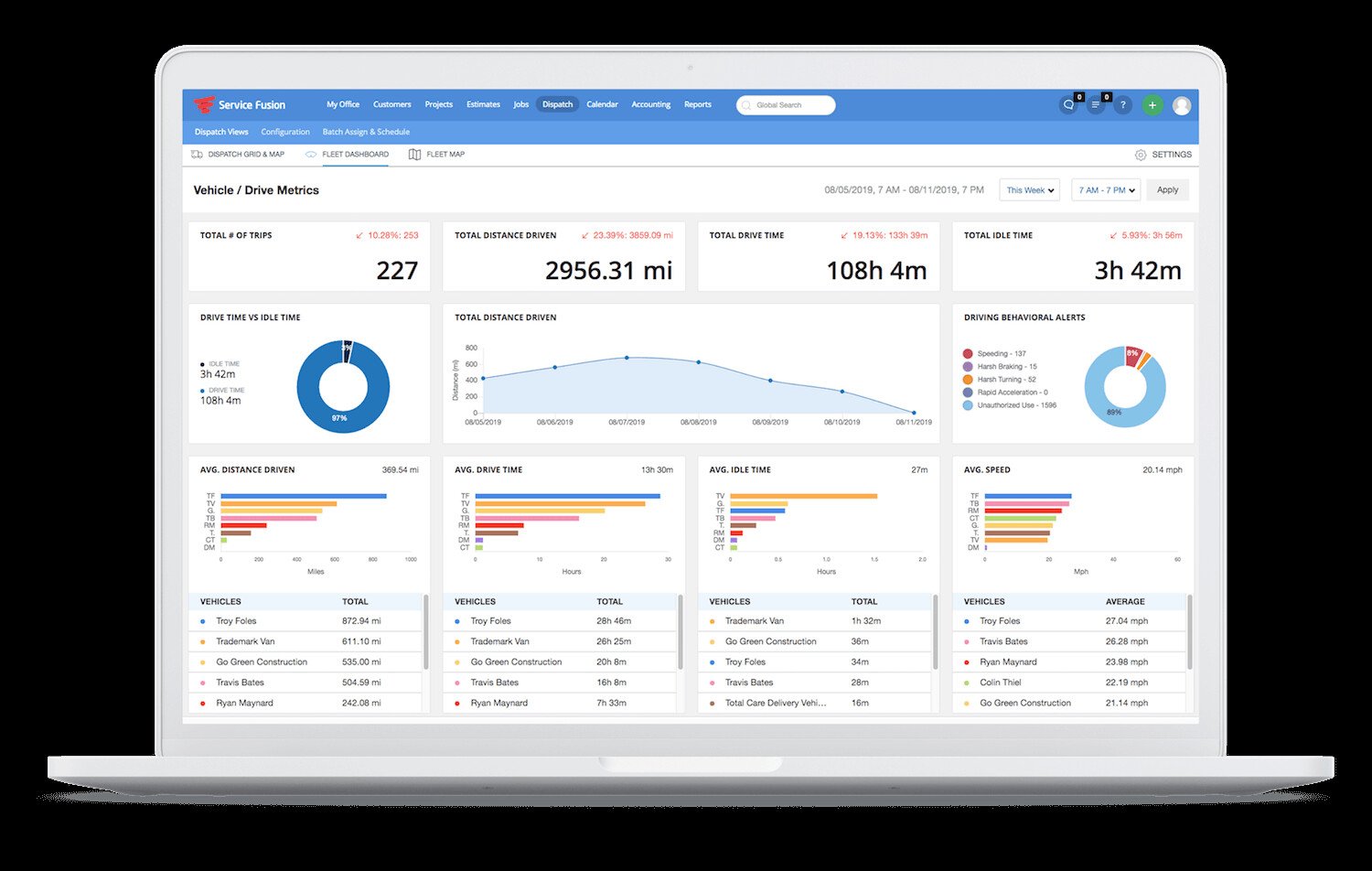
- GPS Units: You typically pay for the hardware (Hardwired or OBD) plus a small monthly data fee per truck.
- ServiceCall.ai: The VoIP system is an add-on cost per line, similar to RingCentral but integrated.
Compare fully: Field Service Software Pricing Index
Unique Features
Our research simulation highlighted niche terms like “hardwired GPS” and “progressive billing.” Here is how Service Fusion tackles these specific needs.
Integrated GPS Fleet Tracking (Hardwired vs. OBD)
Most FSMs just integrate with a third party. Service Fusion is the fleet tracking provider.
- Hardwired: Best for theft prevention. It’s buried in the dash.
- OBD (Plug-in): Best for quick install.
- The Benefit: Dispatchers see the truck icon moving on the schedule map. If a customer asks “Where is he?”, you can say “He is at the intersection of Main and 5th” instantly.
ServiceCall.ai (Built-in VoIP Dialer)
This feature mimics ServiceTitan’s “Phones Pro” at a fraction of the cost.
- When a customer calls, a “Screen Pop” appears on your computer with their name, address, and recent job history.
- You can record calls for quality assurance.
- It tracks which marketing number they called, helping with ROI attribution.
Progressive Invoicing for Projects
If you do large installation jobs (e.g., commercial HVAC install), you don’t bill everything at once.
- Progressive Billing: You can invoice 30% down, 30% at rough-in, and 40% at completion.
- Service Fusion tracks the “Total Contract Value” vs. “Billed to Date” perfectly.
Core Operations Breakdown
Dispatching & Capacity Management
The dispatch board is a grid-style view.
- Drag-and-Drop: Move jobs easily.
- Color Coding: Jobs turn green when started, red if overdue.
- Capacity: It lacks the automated “don’t book more than $5k today” logic of ServiceTitan, but it gives enough visibility for a human dispatcher to manage 20 trucks effectively.
- Deep Dive: Dispatch & Scheduling Software Guide
Inventory Multi-Location Bins
Service Fusion handles inventory well for mid-sized operations.
- Multi-Location: Track stock in the main warehouse vs. Truck 1 vs. Truck 2.
- Purchase Orders (POs): You can generate POs directly in the system and send them to suppliers like RE Michel or Ferguson.
The Technician Mobile App
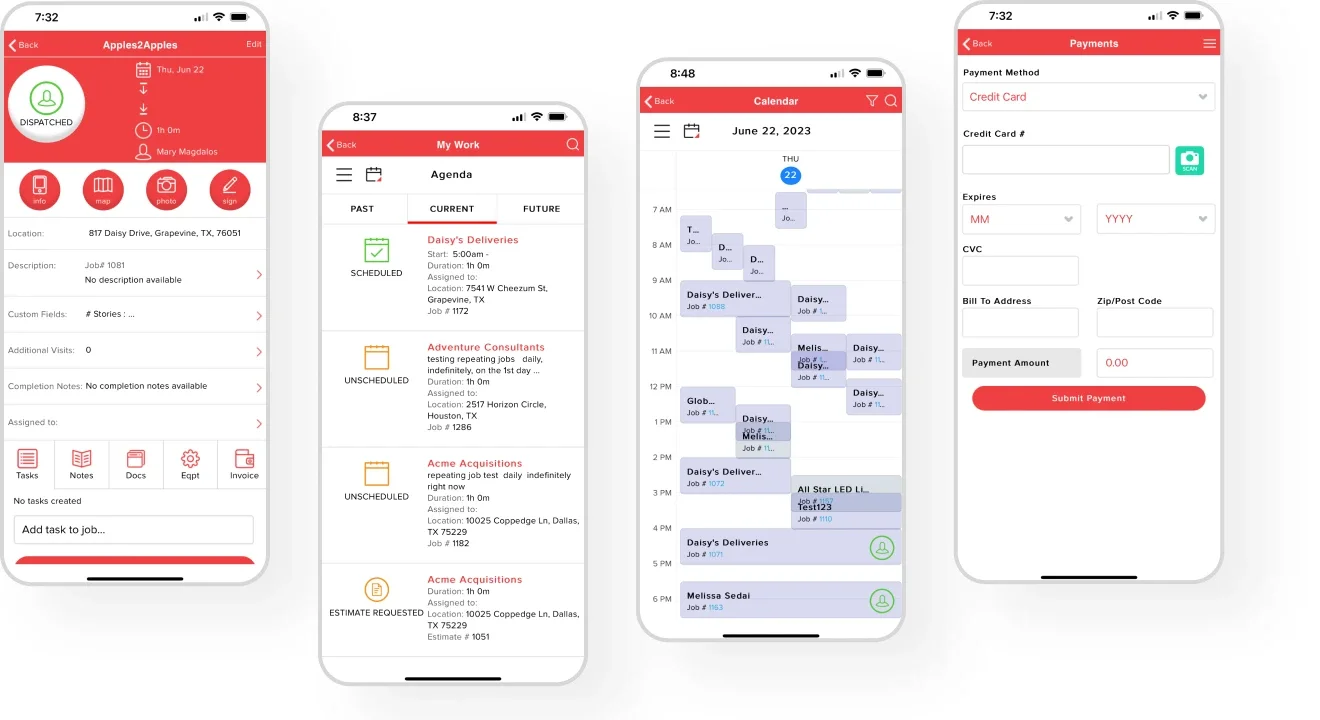
The app allows techs to:
- View job history.
- Create multi-option quotes (Good/Better/Best).
- Payment Processing: Capture signatures and credit cards.
- Critique: It is functional but not as “slick” as Housecall Pro. It feels more like a data-entry tool than a consumer app.
- Deep Dive: Technician Mobile App Features
Integrations (QuickBooks & Payments)
- QuickBooks: Supports both Online and Desktop. The Desktop sync is solid, though not “Live” like FieldEdge. It runs on a web connector schedule (e.g., every 10 minutes).
- FusionPay: Their built-in payment processor. Rates are competitive (~2.9%). Using it often unlocks better support tiers.
Service Fusion vs. Competitors
Service Fusion vs. ServiceTitan
- Choose ServiceTitan if you are a large enterprise ($5M+ revenue) that needs automated marketing and strict tech compliance workflows.
- Choose Service Fusion if you want 80% of those features (GPS, VoIP) but want to pay 30% of the price.
Service Fusion vs. Housecall Pro
- Choose Housecall Pro if ease of use and automated postcards are your priority.
- Choose Service Fusion if you have a large office staff (saving money on licenses) and need integrated fleet tracking.
Frequently Asked Questions
Is there a limit on users?
With the “Unlimited Office Users” feature, there is no limit on dispatchers, managers, or bookkeepers. You only pay extra when you add more field technician licenses.
Does the GPS drain battery?
The hardwired GPS units draw power from the truck’s battery but use very little energy; they won’t kill a healthy battery. OBD units power on only when the ignition is active (or in low-power sleep mode).
Can I use my own VoIP phones?
ServiceCall.ai is softphone-based (runs on the computer/headset). You can forward calls to physical phones, but the “Screen Pop” feature works best when using the computer dialer.
Does it support flat-rate pricebooks?
Yes. You can import your own flat-rate excel sheets or integrate with third-party providers.
Is the setup difficult?
It is “medium” difficulty. It’s harder than Jobber (which you can do yourself) but easier than ServiceTitan. Expect to spend 2-4 weeks working with their onboarding team to get everything configured correctly.