
Executive Summary (TL;DR)
FieldEdge (formerly dESCO) is a legacy powerhouse with one specific superpower: It has the tightest, “Live” integration with QuickBooks Desktop on the market. If your HVAC or Plumbing business relies on QBD Enterprise/Premier for complex job costing and you refuse to switch to the cloud, FieldEdge is likely your best (and only) viable option.
However, be warned: Since its acquisition by Xplor Technologies, users report a noticeable decline in support quality. The interface is dated, the mobile app can be sluggish, and the 12-month contract is strict. If you use QuickBooks Online, do not buy this software—look at Jobber or Housecall Pro instead.
Let’s be brutally honest right from the start.
If you are a modern startup running your books on QuickBooks Online, or if you are looking for a sleek, “Apple-like” software experience that your millennial technicians will pick up in five minutes, you are on the wrong page. You should close this tab and read our reviews of Jobber or Housecall Pro instead.
However, if you are a veteran HVAC or Plumbing business owner who has been running QuickBooks Desktop (Enterprise or Premier) for 20 years, and you refuse to switch to the cloud because you trust your server more than the internet—FieldEdge was built specifically for you.
You probably remember them as dESCO. They practically invented field service software in 1980. They are not the prettiest software. They are certainly not the cheapest. But they have built a moat around the QuickBooks Desktop ecosystem that the new giants like ServiceTitan struggle to cross.
In this 2026 deep-dive review, we are tearing down the “Call for Pricing” wall, analyzing the impact of the Xplor Technologies acquisition on customer support, and helping you decide if the “Live Sync” is worth the price tag.
Review Snapshot
Before we get into the technical weeds, here is the high-level scorecard for the busy owner.
| Feature | Details |
|---|---|
| 🏆 Overall Rating | ⭐⭐⭐⭐☆ (4.2 / 5.0) |
| 🎯 Best For | HVAC & Plumbing Companies running on QuickBooks Desktop |
| 💰 Pricing Model | Custom Quote / Per License (Estimated $100+ per user) |
| ✅ The Pros |
|
| ❌ The Cons |
|
| 🛠 Support | Phone, Email, Dedicated Account Manager |
| 🏁 Final Verdict | Visit FieldEdge Website |
The “QuickBooks Desktop” Factor: Why It’s the Only Reason to Buy
Most field service software reviews gloss over the accounting integration. They treat it like a checkbox: “Yes, it syncs.”
But for you—the owner with 15 years of data in a QuickBooks Desktop Enterprise file—the “Sync” is the difference between a smooth operation and a bookkeeping nightmare.
Field service software typically talks to QuickBooks Desktop via a tool called the Web Connector. This is a piece of middleware that runs on your server.
The “Batch Sync” Problem (Competitors)
Most modern competitors (ServiceTitan, Housecall Pro) use what is called a “Batch Sync.”
- Your tech completes a job at 10:00 AM.
- The software puts that invoice in a queue.
- The Web Connector runs (usually every 15-30 minutes, or manually at the end of the day).
- The Risk: If you try to run payroll or check inventory before that sync happens, your numbers are wrong. If the sync fails (Error 3140), you have to fix it tomorrow.
The FieldEdge “Live Sync” Advantage
FieldEdge uses a proprietary connection method developed during their dESCO days. They call it “Live Sync.”
When your technician creates an invoice in the FieldEdge app and clicks “Complete,” that invoice attempts to post to your QuickBooks Desktop file instantly.
- Real-Time Inventory: If a tech sells a capacitor, it is deducted from your QuickBooks inventory asset account immediately.
- Instant Revenue: Your bookkeeper sees the revenue the second the job is done.
- Two-Way Data: If you change a customer’s address in QuickBooks, it updates in FieldEdge immediately. Most competitors only push data one way (App -> QB).
The Verdict: If your business logic relies on QuickBooks Desktop being the “Source of Truth” for every transaction, FieldEdge is the only software that respects that authority.
Warning: While the sync is “Live,” it is notoriously fragile regarding server permissions. If someone leaves a “Pop-up” window (like “Edit Item”) open in QuickBooks on the server, the sync will pause. This is a QuickBooks limitation, but FieldEdge users feel the pain.
FieldEdge Pricing: The Hidden Costs Revealed (2026 Estimates)
FieldEdge does not publish pricing on their website. They use a “Value Based” sales model, which means they want to get you on a demo to justify the cost before showing you the price tag. This lack of transparency is a major frustration for contractors trying to budget.
We have analyzed user reports, contract leaks, and forum discussions from 2025-2026 to reconstruct their pricing model.
The Estimated Cost Structure
| Fee Type | Estimated Cost | Notes |
|---|---|---|
| Implementation Fee | $4,000 – $6,000 | One-time. Covers data migration, training, and setup. Negotiable if you sign a longer contract. |
| Desktop Office License | $100 – $150 / mo | Per user. Required for dispatchers, bookkeepers, and managers. |
| Mobile License | $100 – $125 / mo | Per user. Required for every technician in the field. |
| QuickBooks Link | Included | Some legacy plans charged extra; now standard. |
The Hidden “Per User” Tax:
Unlike ServiceTitan, which typically charges “Per Truck” (allowing unlimited office users in some plans), FieldEdge charges for everyone. If you have a heavy office staff (Sales Manager, Service Manager, 3 Dispatchers, 2 Bookkeepers), your monthly bill will balloon quickly.
Not sure if you can afford this? Use our ROI Calculator to see how much time software could save you. And check other Free Tools & Calculators for Field Service Management.
The Contract Trap
This is the single biggest complaint we see on Reddit and Capterra. FieldEdge almost always requires a 12-Month Contract.
- Cancellation: If you try to leave in Month 4 because the software isn’t working for you, you are liable for the remaining 8 months. They rarely waive this.
- Auto-Renewal: Check your contract for the “Auto-Renew” clause. It often states that unless you send a certified cancellation letter 60 days before your contract ends, you are automatically locked in for another year. Mark your calendar.
Related: Compare this to Jobber’s pricing, which offers month-to-month flexibility and transparent tiers.
Features Deep Dive: Dispatch, Pricebook & Sales
FieldEdge is a robust, mature platform. It covers the basics of dispatching and invoicing competently, but it lacks the “flash” of newer tools.
1. The Dispatch Board (Good)
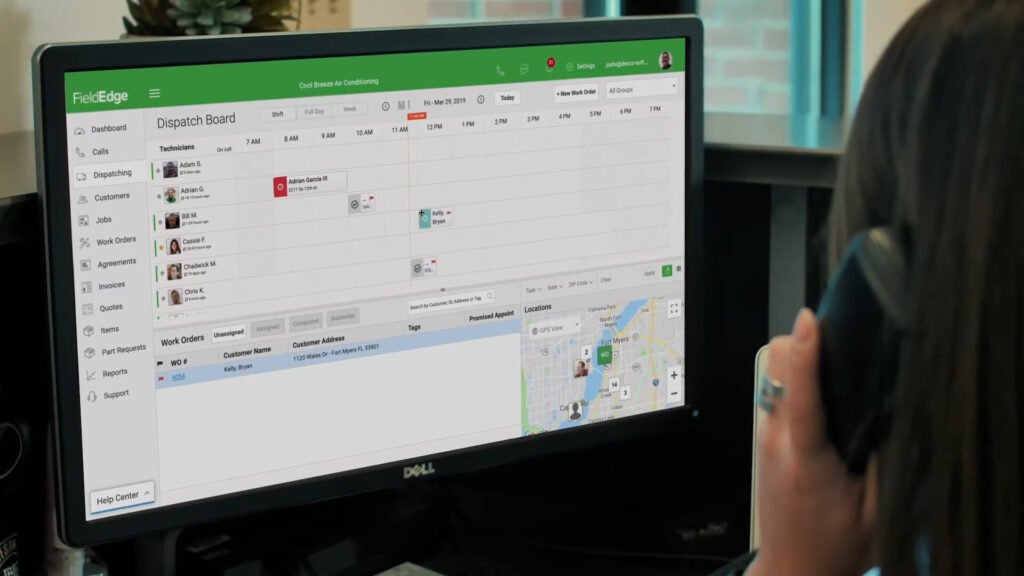
The dispatch board is the command center, and FieldEdge sticks to a classic, color-coded block design.
- Visuals: It looks like a digital whiteboard. For dispatchers used to paper or whiteboards, the transition is intuitive.
- Smart Dispatching: It highlights technicians based on Skill Set and Zone. If you have a “Commercial Boiler Repair” job, it greys out the residential techs who only do A/C.
- Map View: The routing feature is solid, allowing you to visually group jobs to reduce drive time.
2. The Mobile App (The Bad)
The mobile app is where the software’s age shows.
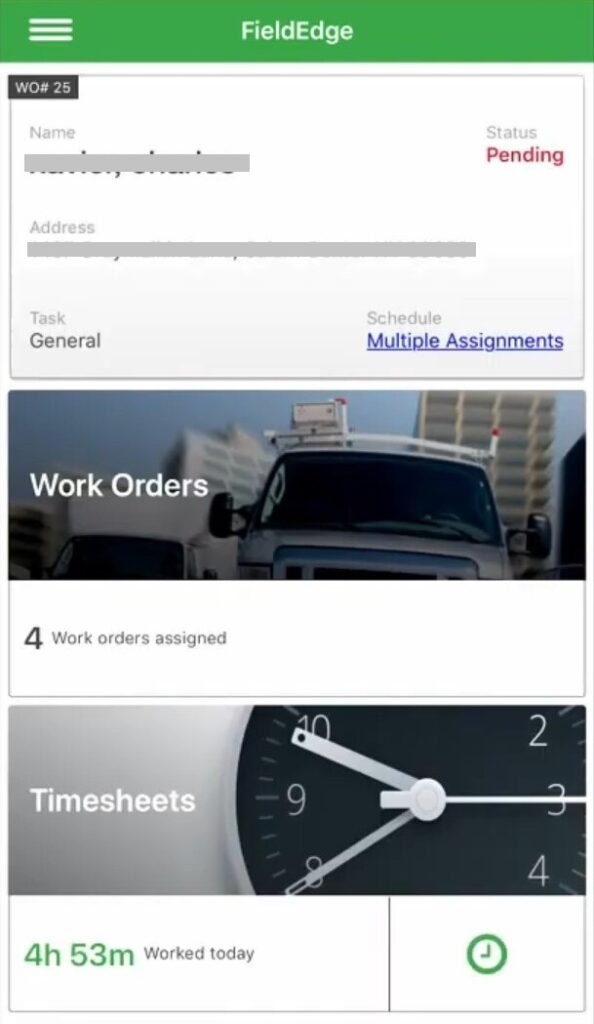
- Interface: The UI looks like it belongs in 2016. It is text-heavy and requires many clicks to navigate through a work order.
- The “Spinning Wheel”: A common complaint in 2025 is app lag. Because FieldEdge tries to “Live Sync” so much data (pulling huge customer history files from your server), the app can be sluggish.
- The Redemption (Offline Mode): However, it has a true Offline Mode. If your tech is deep in a commercial boiler room with no cell signal, they can still view the job, add parts, and complete the work. It syncs when they walk outside. For commercial HVAC, this is non-negotiable.
3. Pricebook & Flat Rate
FieldEdge integrates well with third-party flat rate providers like Coolfront and ProfitRhino.
- Feature: If you import a flat rate book, the tech just searches “Capacitor” and sees the bundled price (Part + Labor + Markup).
- Limit: The native pricebook management tool is clunky compared to ServiceTitan’s Pricebook Pro. You will likely need an external tool to manage your prices effectively.
4. Service Agreements
FieldEdge excels at tracking recurring revenue.
- Deferred Revenue: It handles the complex accounting of “Service Agreements” correctly, tracking the liability in QuickBooks until the service is performed.
- Reminders: It automatically generates work orders when a seasonal tune-up is due, ensuring you don’t miss those touchpoints.
- Related: See how to leverage memberships and service agreements for growth.
Marketing & Reporting: The Weakest Link
While FieldEdge excels at operational mechanics (dispatching, accounting), it falls significantly short in the “Growth” category. If your primary goal is to double your revenue through automated marketing, FieldEdge will disappoint you compared to its rivals.
Marketing Automation (Missing)
Modern competitors like ServiceTitan and Housecall Pro have built-in “Marketing Engines.” They automatically send:
- “We miss you” emails to customers not seen in 12 months.
- “Your warranty is expiring” postcards.
- Automated review requests that filter for 5-star experiences.
FieldEdge lacks these native automations.
To achieve this in FieldEdge, you typically have to export your customer list to Mailchimp or Constant Contact. This creates a “data silo” where your marketing data lives separately from your job data. You lose the ability to see the direct ROI of a specific email campaign on your dispatch board.
Reporting Dashboards (Basic)
FieldEdge provides standard reports (Sales by Technician, Revenue by Zip Code), but they are often described as “static.”
- The Limitation: You cannot easily “drill down” into the data. In ServiceTitan, you can click a bar graph and see the specific invoices that make up that number. In FieldEdge, the reporting is more rigid.
- Employee Productivity: Users report frustration with tracking “non-billable time” effectively. If you want to know exactly how many minutes a tech spent driving vs. working, FieldEdge’s GPS reporting is less granular than dedicated fleet management tools.
The Verdict: FieldEdge is an Operating System, not a Growth Engine. It will help you manage the work you have, but it won’t actively help you find new work.
The “Xplor” Factor: Has Support Declined?
In recent years, FieldEdge (and dESCO) was acquired by Xplor Technologies, a massive global conglomerate that owns dozens of software brands (including Service Autopilot).
When a niche software company gets bought by a Private Equity-backed giant, the result is predictable: The “Family Feel” disappears.
The Voice of the Customer (2025/2026 Data)
We scoured industry forums like HVAC-Talk and Reddit to find the truth about the post-acquisition experience. The feedback is concerning:
- Wait Times Exploded: Users report that “Live Chat” wait times have jumped from <5 minutes to 20+ minutes during peak hours. Some users even claim phone support lines are effectively “shut off” or go straight to voicemail after 4:00 PM EST.
- The “Ghosting” Issue: A recurring theme is technical tickets being “escalated to Tier 2” and then vanishing. One user noted, “They close the ticket automatically if you don’t reply within 24 hours, even if they haven’t fixed the issue yet.”
- Account Management: Turnover is high. You may have a different “Customer Success Manager” every 6 months, meaning you constantly have to re-explain your business to a new rep who doesn’t know your history.
Editor’s Note: If you value having a support rep who knows your name (like you might get with Jobber), FieldEdge might frustrate you. You are now a ticket number in a global system.
FieldEdge vs. The Competition (Comparison Matrix)
How does FieldEdge stack up against the market leaders? This table exposes the stark differences in strategy.
| Feature | FieldEdge | ServiceTitan | Housecall Pro |
|---|---|---|---|
| QBD Live Sync | ✅ Yes (Exclusive) | ❌ No (Batch Only) | ❌ No (Batch Only) |
| Ideal Customer | Legacy QBD Users | Enterprise (5+ Trucks) | Residential SMB (1-10 Trucks) |
| Setup Fee | ~$4,000 – $6,000 | $3,000 – $15,000 | $0 |
| Contract | 12-Month Lock-in | 1-3 Year Lock-in | Month-to-Month |
| Marketing Auto | ❌ Weak | ✅ Excellent | ✅ Good |
| Mobile App | ⭐⭐⭐ (3/5) | ⭐⭐⭐⭐ (4/5) | ⭐⭐⭐⭐⭐ (4.5/5) |
| Support | ⭐⭐ (Slow) | ⭐⭐⭐⭐ (Premium) | ⭐⭐⭐⭐ (Chat) |
FieldEdge vs. ServiceTitan
- The Battle: The Legacy vs. The Future.
- Choose FieldEdge if: You absolutely refuse to leave QuickBooks Desktop and want to pay slightly less per month than ST.
- Choose ServiceTitan if: You are willing to switch to QuickBooks Online or Intacct to get superior marketing automation, a modern customer experience (Uber-style tracking), and aggressive sales tools. ServiceTitan is more expensive but significantly more powerful.
- Read more: ServiceTitan Review
FieldEdge vs. Housecall Pro
- The Battle: Enterprise vs. SMB.
- Choose FieldEdge if: You have complex inventory, progress billing needs, or 10+ trucks using QBD.
- Choose Housecall Pro if: You are a residential service business with 1-10 trucks using QuickBooks Online. HCP is cheaper, faster to set up, and much easier for technicians to use.
- Read more: Housecall Pro Review
Who Should Avoid FieldEdge? (The Anti-Persona)
We have praised FieldEdge for its QuickBooks Desktop integration. But for 80% of the market, this software is the wrong choice.
Do NOT buy FieldEdge if:
- You use QuickBooks Online: The integration works, but FieldEdge is expensive and clunky compared to native cloud apps. You are paying for a “Desktop” architecture you don’t need.
- You are a Startup: The $4,000+ implementation fee is a massive barrier to entry. You can get started on other platforms for $0 down.
- You hate Contracts: If you want the freedom to cancel anytime, FieldEdge’s 12-month contract will feel like a prison.
- You are a Marketing-First Company: If you need automated email drip campaigns, reputation management, and dynamic call tracking, FieldEdge’s built-in marketing tools are primitive.
Final Verdict: The “Life Raft” for Desktop Users
FieldEdge is a tool caught in the middle. It is trying to be a modern SaaS platform while being anchored to a 20-year-old desktop accounting system.
We recommend FieldEdge ONLY if:
- You are an established HVAC or Plumbing business (5+ trucks).
- Your entire business logic (Inventory, Payroll, Job Costing) is built on QuickBooks Desktop Enterprise/Premier.
- You have a dedicated bookkeeper who refuses to change their workflow.
- You need robust Offline capabilities for commercial work.
For this specific user, FieldEdge is a savior. It keeps your old accounting ship afloat while giving your technicians a digital paddle. It bridges the gap between the server in your closet and the iPad in the truck better than anyone else.
But for everyone else?
If you are flexible on accounting or starting fresh, the market has moved on. Competitors offer better mobile apps, better marketing tools, and better support for the same (or lower) price.
Rating: 3.5/5 Stars (5/5 for QBD Users; 2/5 for Everyone Else).
Next Steps
- Ready to compare costs? See our Field Service Software Pricing Index.
- Struggling with the sync? Read our QuickBooks Integration Troubleshooting Guide.
- Need a second opinion? Check our Jobber vs. ServiceTitan Comparison.
Frequently Asked Questions
How much does FieldEdge actually cost?
FieldEdge does not publish pricing, but estimates place it around $100 to $150 per user per month. There is also typically a significant upfront implementation fee ranging from $4,000 to $6,000, depending on the size of your company and the complexity of your data migration.
Does FieldEdge work with QuickBooks Online?
Yes, FieldEdge integrates with QuickBooks Online. However, its primary competitive advantage is its deep, live integration with QuickBooks Desktop. If you are already using QuickBooks Online, other software options like Jobber or Housecall Pro may offer a smoother, more cost-effective experience.
Is there a FieldEdge free trial?
No. FieldEdge does not offer a self-serve free trial. You must schedule a demo with a sales representative to see the software. This is common for enterprise-level software that requires complex configuration.
Can I use FieldEdge without internet (offline)?
Yes. FieldEdge has a robust offline mode. Technicians can view work orders, add parts, and complete jobs without a cellular signal. The data will sync back to the office once the device regains an internet connection.
Is FieldEdge owned by Xplor?
Yes. FieldEdge (formerly dESCO) was acquired by Xplor Technologies. This acquisition has brought more resources to the company but has also led to user complaints regarding longer support wait times and a more corporate customer service experience.
How does FieldEdge compare to ServiceTitan?
ServiceTitan is generally more expensive and feature-rich, particularly in marketing and sales automation. FieldEdge is often preferred by companies that want to stay on QuickBooks Desktop, as ServiceTitan often encourages users to migrate to QuickBooks Online or Intacct for the best experience.